Why BIM Issues Get Lost Across Emails, Teams, and PDFs
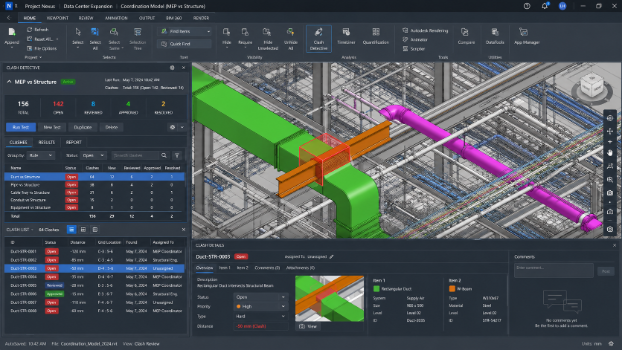
BIM issues do not usually get lost because the project team is careless. They get lost because the problem leaves the model and starts living in too many places at once. A clash may begin in Navisworks, get exported as a PDF report, discussed in Teams, clarified in an email, updated during a phone call, and finally acted on from an outdated spreadsheet. By the time someone asks whether it is resolved, the answer depends on which record they are looking at. In data center construction, that gap is not just administrative noise. A missed issue around power distribution, UPS clearance, cable routing, cooling airflow, or redundancy pathways can turn into expensive rework, schedule delays, and operational reliability risk.
Why BIM Issues Get Lost Across Emails, Teams, and PDFs
BIM coordination relies on context. An issue is only useful when the team can see the exact model element, location, discipline, owner, deadline, and status. When that information is split across emails, PDFs, notes, comments, and conversations, the issue loses its technical meaning.
The Real Problem Is Not Communication, It Is Fragmented Communication
Most project teams communicate constantly. The problem is that scattered emails, phone calls, text messages, PDF reports, and spreadsheets create parallel records. One person may think an issue is assigned. Another may think it is waiting for approval. A third may be working from an old comment.
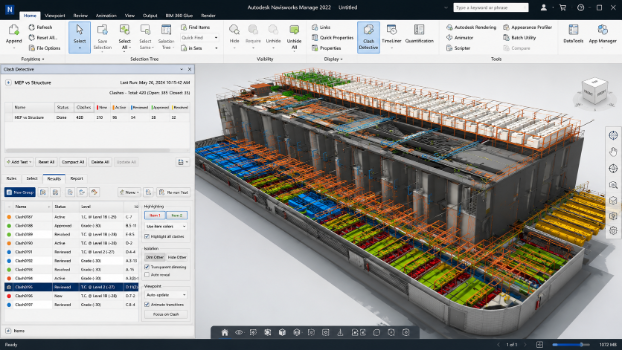
Fragmented communication creates communication gaps because the discussion is no longer tied to the BIM environment. The team may be talking about the same clash, but not from the same source of truth.
Why PDFs and Screenshots Fail as Issue Records
PDF reports are useful for documentation, but they are weak as live issue tracking tools. A PDF can show a clash, but it cannot reliably carry real-time updates, approval status, ownership, or current model versions.
Screenshots are even riskier. They capture a moment, not the workflow. If the 3D model changes after the screenshot is shared, the issue may already be outdated before it reaches the next reviewer.
How Teams Chats and Email Threads Create Version Confusion
Teams chats and email threads move fast. Decisions get buried between comments, reactions, attachments, and side conversations. When model versions change, old instructions can still circulate.
This is how outdated model versions create field errors. A team may resolve a clash based on yesterday’s model while another trade has already rerouted the system in today’s coordination file.
The Core Concepts Behind BIM Issue Tracking
Issue tracking is not just about finding problems. It is about managing coordination issues from discovery to resolution with clear visibility.
Issue Tracking vs. Issue Management
Issue tracking records the problem: what it is, where it is, and who needs to respond. Issue management goes further. It defines responsibility structure, deadlines, status, approval, and closure.
Without issue management, assigned issues become open-ended tasks. Everyone sees the problem, but no one owns the outcome.
Clash Detection vs. Clash Resolution
Clash detection identifies conflicts between model components. Clash resolution requires technical judgment. A duct may clash with cable routing, but the correct fix depends on access clearance, sequencing, equipment priority, and system performance.
In mission-critical infrastructure, not every clash has equal weight. A minor architectural conflict is not the same as a UPS clearance issue or a busway routing conflict.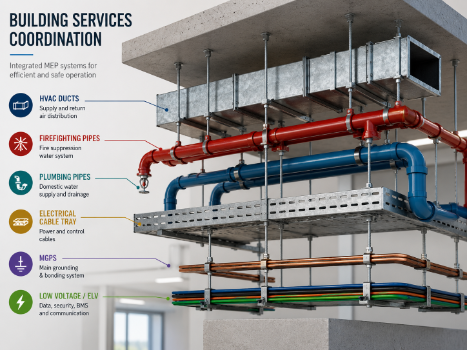
Why Model Context Matters
A BIM issue must stay connected to model elements, viewpoints, and the 3D model. Without model context, a comment like “move tray up” is dangerously vague.
Which tray? Which room? Which revision? Which trade owns the move? Good BIM coordination removes that ambiguity.
How Disconnected Tools Break BIM Coordination Workflows
Many teams use Revit, Navisworks, Solibri, spreadsheets, PDFs, and cloud folders at the same time. The tools may be strong individually, but disconnected workflows create risk.
The Problem With Tool Handoffs
Every handoff strips away context. A clash found in Navisworks becomes a screenshot. The screenshot becomes a PDF. The PDF becomes an email attachment. The email becomes a Teams discussion.
By the time the issue reaches the field, it may no longer point back to the original model component.
Why Status Updates Get Outdated
Status is often updated in one place but not another. The spreadsheet says open. The email says resolved. The BIM platform says pending review.
This weakens trust in the process and forces teams to recheck work manually, which adds delays.
How Visibility Breaks Down Between Office and Field
Field BIM coordination depends on current information. Job-site teams need mobile access to field updates, not static reports from last week.
When the office and field are not working from the same issue record, on-site conflicts become harder to prevent.
The Role of a Central BIM Environment
A central BIM environment gives issues a permanent home. It connects the shared model, comments, ownership, deadlines, approvals, and resolution history.
Creating a Single Source of Truth
A single source of truth does not mean fewer conversations. It means every conversation points back to one central system.
When issue tracking lives inside a centralized digital model or cloud platform, teams know where to verify current status.
Real-Time Updates and Real-Time Collaboration
Real-time updates matter because construction sequencing changes quickly. A design change in an electrical room can affect busways, cable routing, containment systems, and cooling airflow.
Real-time collaboration helps teams coordinate before the problem becomes field rework.
Clear Ownership and Accountability
Every issue needs clear ownership. The right person must be assigned, the deadline must be visible, and the status must be current.
Accountability is not about blame. It is about making sure responsibility does not disappear between tools.
Why Audit Trails and Legal Trails Matter
In large projects, especially data centers, teams need to know who changed what, when, and why.
Tracking Who Did What and When
Audit trails preserve decisions, comments, approvals, and status changes. They help project leaders understand whether an issue was ignored, reassigned, rejected, or resolved.
Preventing Blame Loops
When the legal trail is scattered across emails and PDFs, disputes become messy. A central record reduces blame loops because the issue history is visible.
Connecting Issue History to Model Versions
Model versions are critical. An issue may be valid in one version and irrelevant in another. Version-linked issue history keeps teams from solving old problems twice.
Technical Standards That Support Better BIM Issue Management
Standards help teams exchange issue data without losing technical meaning.
What BIM Collaboration Format Means
BIM Collaboration Format, or BCF, allows teams to share issue information, viewpoints, comments, and assignments without sending full models each time.
Why IFC GUIDs Help Preserve Model Identity
IFC GUIDs help identify model elements across platforms. This supports traceability when teams use open standards and multiple BIM tools.
Open Standards and Cross-Platform Coordination
Open standards matter because real projects rarely use one platform. Revit, Navisworks, Solibri, and cloud coordination tools must work together.
The Cost of Lost BIM Issues
Lost issues create cost overruns, schedule delays, expensive rework, and damaged trust.
How Small Coordination Errors Become Expensive Rework
A missed cable tray conflict can force crews to stop installation, redesign routing, and reinstall work. In electrical distribution, small errors multiply quickly.
How Lost Issues Delay the Construction Process
One unresolved issue can block several trades. If power distribution, cooling, and structural supports overlap, the construction process slows until coordination is restored.
How Visibility Problems Damage Trust
When visibility breaks down, teams stop trusting the system. They duplicate checks, hold extra meetings, and protect themselves instead of solving issues.
Why This Matters More in Mission-Critical Infrastructure
Data centers depend on uptime, redundancy, and operational reliability. Lost BIM issues can affect systems that must perform continuously.
Power Distribution and Electrical Coordination Risks
Power distribution requires exact coordination between electrical rooms, UPS systems, PDU layouts, busways, cable routing, and access zones. A clash here can affect installation, maintenance, and future expansion.
Backup Systems, Redundancy, and Uptime
Backup systems and redundancy models rely on clean coordination. In Tier III and Tier IV environments, downtime risk is designed out through separated paths, resilient architecture, and disciplined issue resolution.
Load Calculations and Equipment Planning
Load calculations influence equipment sizing, routing space, and electrical capacity. If related issues live only in emails or PDFs, teams may miss design impacts until late construction.
Cooling Coordination and Energy Performance
Cooling systems interact heavily with electrical architecture.
Cooling Airflow and Spatial Conflicts
Cable trays, busways, and containment can affect cooling airflow. Poor coordination may create airflow disruption or hotspots.
CRAH Units, Containment Systems, and Access Clearance
CRAH units and containment systems need clear access for maintenance. If access issues are missed, operational teams inherit the problem after handover.
Liquid Cooling and New Coordination Demands
Liquid cooling adds piping, leak detection, power density, and serviceability concerns. These issues need live model context, not scattered comments.
Energy Efficiency, Sustainability, and Future-Ready BIM Coordination
Better coordination supports better energy use and sustainability outcomes.
Reducing Rework Supports More Efficient Delivery
Less rework means less wasted material, labor, and site disruption. That is a practical sustainability benefit.
Energy Optimization Starts With Coordinated Systems
Energy optimization depends on how power and cooling systems are planned together. BIM coordination helps align capacity, airflow, and maintainability.
Sustainability as a Coordination Outcome
Sustainability is not only a design goal. It is also the result of fewer errors, cleaner workflows, and smarter infrastructure decisions.
Modern Innovations in BIM Issue Management
Modern issue management is moving toward connected, cloud-based, real-time coordination.
Cloud-Based Coordination Platforms
Cloud platforms keep issue data available to designers, coordinators, field teams, and managers in one shared model environment.
Field-to-Office Feedback Loops
Mobile access lets job-site teams send field updates directly into the issue workflow. This reduces dependence on phone calls and delayed reports.
From Static Reports to Living Issue Records
A living issue record includes owner, deadline, status, model view, comments, approval, and audit trails. That is far stronger than a static PDF.
Conclusion: BIM Issues Need a Home, Not Another Message Thread
BIM issues get lost when they are separated from model context, ownership, status, and history. Emails, Teams chats, PDFs, and spreadsheets can support communication, but they should not become the source of truth. For complex construction and mission-critical infrastructure, a central BIM environment protects visibility, accountability, uptime, and trust.